How to Use the Point Directions Tool in Stitch Flow
The Point Directions tool allows you to manipulate stitch angles by defining a specific focal point within an object.

Knowledge base for DRAWings Embroidery Software

The Point Directions tool allows you to manipulate stitch angles by defining a specific focal point within an object.

In this guide, we will explain how to utilize the Combine and Break Apart operations to manage object attributes, reduce embroidery production time, and create complex shapes with holes. The Combine operation merges two or more separate objects into a single entity sharing common attributes (stitch type and color). This is essential for optimizing designs…

This guide explains how to convert standard fill areas into intricate spiral patterns using the Piping stitch type and the Stitch Flow tool in DRAWings PRO XII.

The Align, Auto Size (Resize), and Distribute tools allow you to organize multiple objects relative to one another automatically.
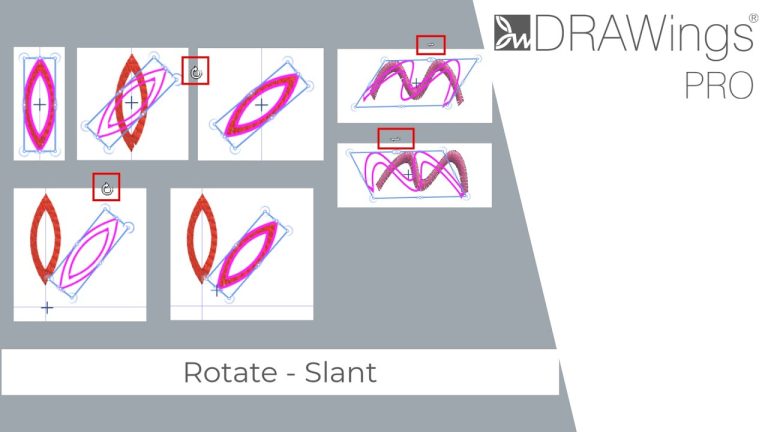
In DRAWings PRO XII, you can easily transform your embroidery designs by rotating or slanting (skewing) specific parts.

In DRAWings PRO XII, you can perform all scaling and positioning operations using the Tool Options bar for numerical precision. However, for a faster workflow, you can manipulate objects directly on the design canvas using the mouse. This guide explains how to select, move, resize, and duplicate objects using visual handles and keyboard shortcuts. 1….

This guide explains how to use the Stitch Flow tool to add organic movement to your designs.

The Outline Shapes tool in DRAWings PRO XII offers several operating modes (Context Menu, DRAWings, Janome Digitizer, and Bezier).

The Tool Options Bar in DRAWings PRO XII allows you to make precise changes to your design using numeric values.