
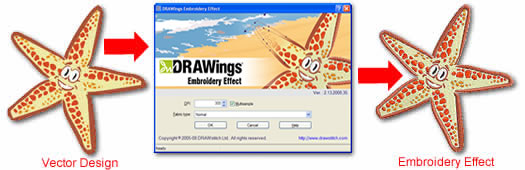
DRAWings Embroidery Effect can convert any vector/bitmap graphic into an embroidery-like image quickly and easily. Just follow these steps:
- Run DRAWings Embroidery Effect from its shortcut in the Start menu.
- Select "Start>All Programs> DRAWings Embroidery Effect>DRAWings® Embroidery Effect".
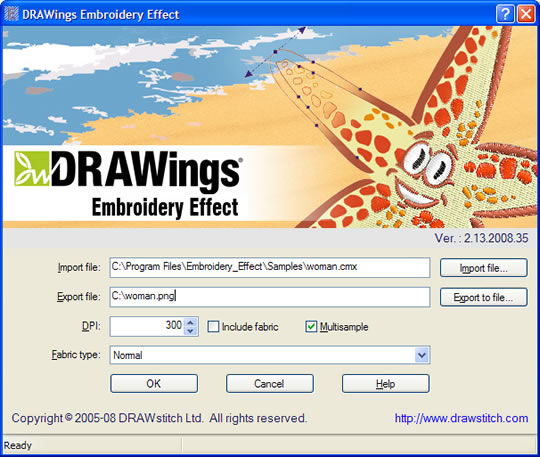
- In the start-up dialog of DRAWings Embroidery Effect that will appear you can import Vector or Bitmap graphic files and apply the Embroidery Effect on them. The result will be saved on a bitmap file which you can then use as you wish.
- Click on the “Import file” button and import a Vector or Bitmap graphic file. Then Click on “Export to file” button and specify the location and the file type of the DRAWings Embroidery Effect image that will be produced.
- Click "OK" to apply the DRAWings Embroidery Effect. All bitmap files will be filled with Cross-stitch embroidery effect stitches and all Vector files will be filled with normal embroidery effect stitches (Satin, fill, Running stitches etc.). For more detailed information on how DRAWings Embroidery Effect works, consult the user’s manual which comes with the application and is located at "Start>All Programs> DRAWings Embroidery Effect>DRAWings_EmbEffect_Help_Manual.pdf"
Optimize the results
DPI value can be adjusted according to your needs. A high value exports a larger file although it will take more time for your computer to export the result. Having checked the “Multi-sample” option, you get smoother embroidery images while leaving it unchecked exports sharper results. The “Fabric Type” option changes the density between the stitches of the embroidery image.
Tips:
Inkjet printing on textile outputs better results when you scale the DRAWings Embroidery Effect image before sending it to the Inkjet printing machine. For an even better stitch appearance, choose the "Light fabric".
Before applying the DRAWings Embroidery Effect on text, conversion to curves is recommended to achieve perfect alignment between the text and the embroidery effect.
In order to get the same results with the actual stitch files you can purchase our DRAWings® embroidery software. In that way you can have unlimited combinations between DRAWings Embroidery Effect printing and actual embroidery stitches, thus create beautiful designs with lower production cost.
Enjoy what you do, it's so simple!
Note:DRAWings Embroidery Effect can be used in combination with (as plug-in of) the CorelDRAW® X3 or 12 graphics software: After you have installed DRAWings Embroidery Effect on your computer you can run it either as a stand-alone application or from within your copy of CorelDRAW® X3 or 12 edition. (Corel and CorelDRAW are registered trademarks of Corel Corporation and/or its subsidiaries in Canada, the U.S. and/or other countries.)